
Inbox triage · Outlook
AI email triage for Outlook
Kerna sorts your open Outlook messages into categories you define, the moment you ask it to. Not Focused and Other. Not someone else’s idea of what is important in your business.
Product facts on this page were last checked against our Privacy Policy and FAQ on .
The problem
The problem is not volume. It is that the inbox has no shape.
An operational mailbox is a queue of unrelated work with no order to it: a quote request, a spec change, a chased invoice, a complaint, and a newsletter, all rendered identically.
- Someone reads every message to find out which ones matter, twice a day, forever.
- The urgent one surfaces late because it looked like the other forty.
- Work sits in a personal mailbox where nobody else can see its state.
- The person who knows how the inbox works is the constraint on the team.
The workflow
How the triage works
Three steps, and you are in control of the third.
- 01
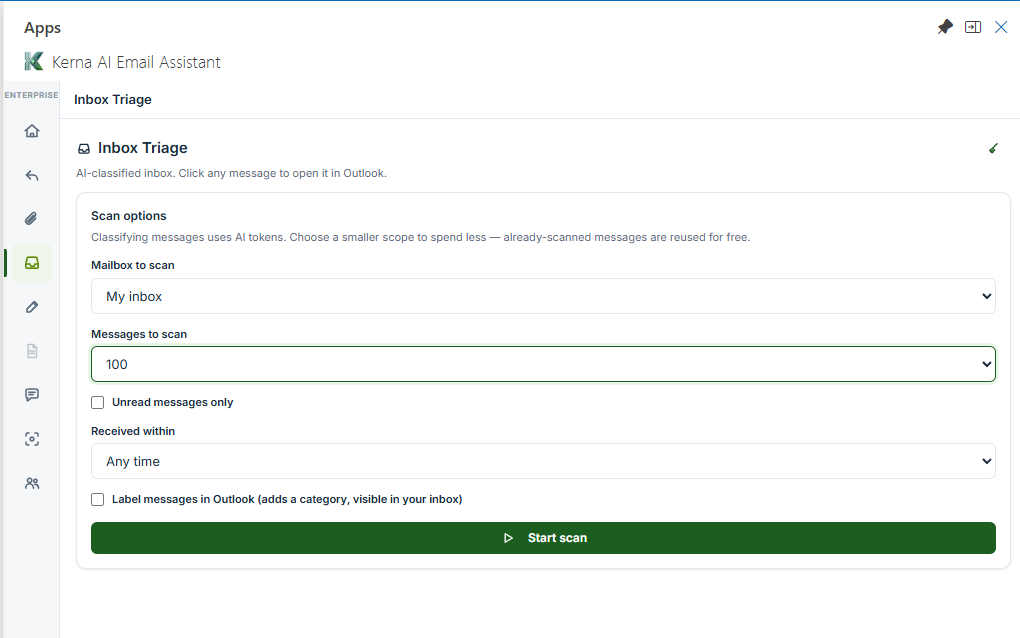
Open Outlook and press Triage
Kerna appears in the ribbon. Nothing has been read until you press it — the add-in does not scan, index or watch the mailbox.
- 02
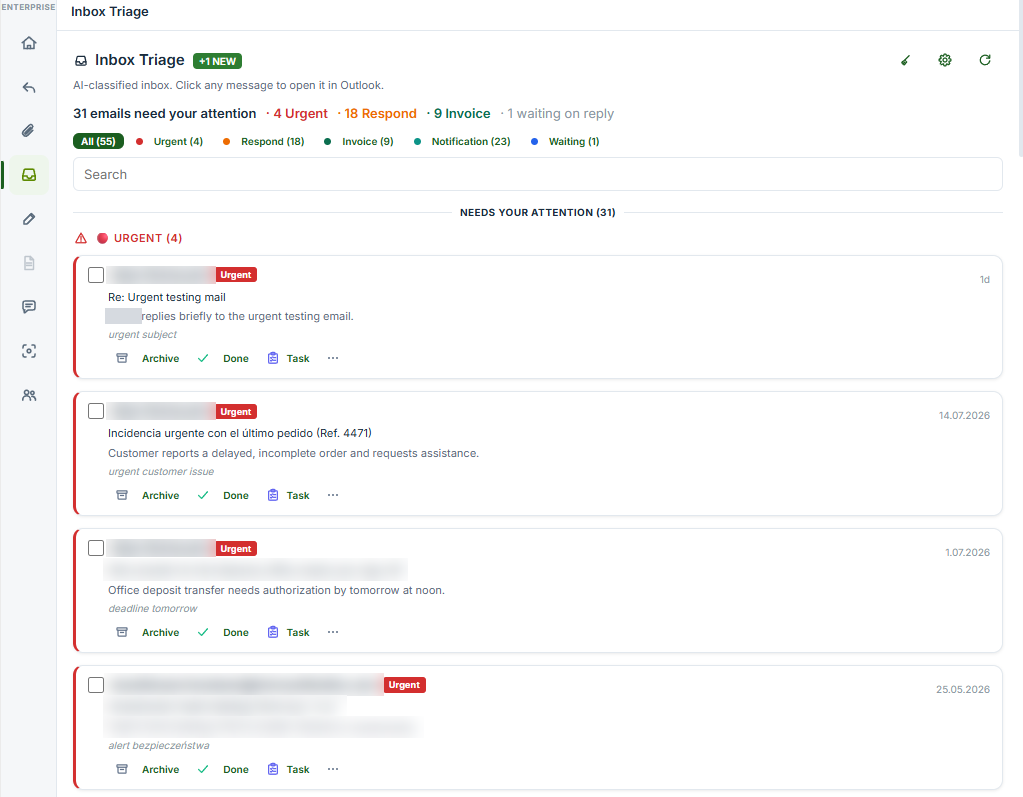
Your open messages are sorted into your categories
Each message is placed in one of your lanes with the reason visible, so you can see at a glance what the inbox actually contains.
- 03
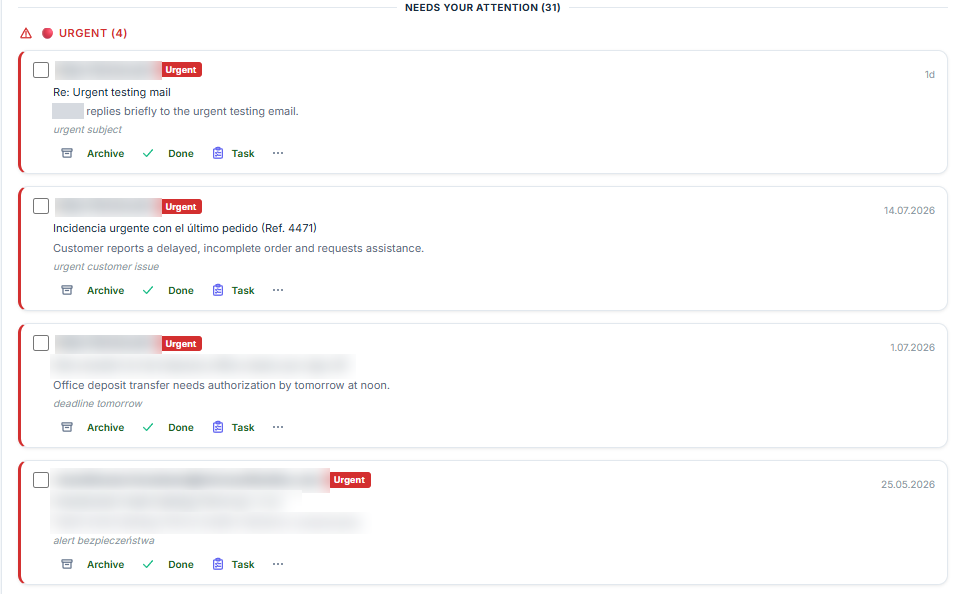
What happens next is yours
Nothing is filed, archived or answered on its own. Kerna sorts and shows the reason it chose each lane; acting on any of it is your step.


The difference
The categories are yours
This is the whole difference. A fixed set of productivity labels — important, promotions, updates — describes mail in general. Your categories describe your work: what the message is asking someone to do, in the words your team already uses for it.
Five built in, to start from

Replace them with your own, up to six
The five defaults are a starting point, not the product. Put in the categories your team actually argues about — Quote requested, Spec change, Chasing payment, Complaint — and Kerna sorts to those instead.
Or start from one of 20 industry taxonomies
Twenty category sets built for specific industries, from legal and manufacturing to recruitment and construction. Start from the one nearest your work and edit it, rather than from a blank list.
It runs when you ask, and files nothing on its own
Triage is an action you trigger. Nothing is moved, archived or replied to unless you decide it — and nothing is read between the times you ask.
Alternatives
Where the alternatives stop
Not a knock on any of them — they are built for different work.
- Focused Inbox
- Two buckets, and you can train it — Microsoft lets you move a message across and say where that sender should go next time. What it cannot do is sort by what the message is ASKING FOR: it judges personal importance, not operational category, and two buckets is two buckets however well trained.
- Inbox rules
- Deterministic, and they match on sender and subject string rather than on what the message is asking for. A quote request and a complaint from the same client land in the same place.
- A general assistant you prompt
- Good at drafting. The categories, though, live in whatever you type into it, so nothing carries from one run to the next unless you paste it in again.
- Building it yourself
- A real option for some teams. It needs a model contract, an evaluation loop to tell you whether the sorting is any good, and someone to own the category set as the business changes — that last part is the one that outlasts the build.
A fuller, dated comparison of every tool in this category is on the comparison page.
After triage
And once the inbox has shape
Triage is the entry point. The work after it is the same work.
Thread summaries and context recovery
Pick up a thread you have never read. Kerna reads the whole conversation and gives you brief, standard or detailed — enough to answer without scrolling back through six weeks.
Structured extraction from the attachment
The operational detail usually sits in the PDF, not the message. Kerna pulls dates, quantities, references and commitments out into a table you can act on.
45 languages, including the thread you are dreading
Read, summarise, translate and reply across 45 languages, so a supplier writing in Italian is not a two-day delay.
Drafting that stops at your compose window
Kerna writes the reply and puts it in front of you. It does not send mail, so the last step is always yours.
Extraction has a page of its own, with the presets, the export targets and what happens to the document: attachment data extraction. For the wider category and seven questions to ask any vendor, read operational inbox management.
Data
What IT and procurement will ask
The short version. The long version, with the source for every claim, is on the trust page.
- Personal data is redacted from the message before anything reaches the model, inside Kerna’s own processing.
- Message content is held in memory for the length of the request and then discarded. Retention for email content is zero.
- Nothing is used to train any model, ours or OpenAI’s.
- Our agreement with OpenAI carries zero data retention terms, so content is not kept once your request has been served.
- The application runs on Google Cloud Run in Belgium and account data sits in Firestore in Poland.
- The Outlook add-in holds Microsoft Publisher Attestation — a published self-assessment against Microsoft’s app compliance programme, not an independent audit.
Everything above, with the clause it comes from and the full permission list, is on the trust page.
What you need to run it
- A mailbox hosted by Microsoft: Microsoft 365, Exchange Online or Outlook.com.
- Microsoft does not load add-ins on accounts connected over POP or IMAP, and mailboxes on an on-premises Exchange server are not supported.
- Runs in Outlook on the web, the new Outlook for Windows and Mac, and classic desktop Outlook.
- A Microsoft 365 administrator can deploy it to the whole organisation from the admin center. Each person still signs in individually to link their plan.
What it costs
Starter is €0 and carries a trial token allowance. Standard is €12 a month, Pro €22, and Business €69 for up to five seats sharing 7,500,000 tokens. Triage is in every plan, the free one included — what the plans differ on is how much you can put through them and how many people are on the account.
See the plansTry it on this morning’s inbox
Starter is €0 and includes every feature, with a trial token allowance to try them on. Install it, press Triage once, and see whether the categories that come back are the ones you would have written.